Admin Ataka
Today, I’m going to explain our monthly subscription plan!

Peach Ninja
Yes, please! I never really understand it!
When will I be charged for my subscription?
Admin Ataka
Once you subscribe to the monthly plan, you’ll be charged immediately for one month, and then the subscription will automatically renew on the same day each month (the day you subscribed).
How do I cancel my auto-renewing monthly subscription?
Peach Ninja
How do I cancel my auto-renewing monthly subscription?
Admin Ataka
Already thinking about canceling? You haven’t even subscribed yet!
Peach Ninja
I know! But what if I need to cancel and don’t know how? Just tell me now!
Admin Ataka
To cancel your subscription on your phone, go to the Play Store app, then Settings > Subscriptions > [your account].
What happens if I delete the app?
Peach Ninja
So, if I delete the app, my monthly subscription will automatically cancel, right?
Admin Ataka
No! Even if you delete the app, your subscription will still renew unless you cancel it through the steps I mentioned above.
Will my subscription fee increase without me knowing?
Peach Ninja
What if the subscription fee goes up after I subscribe? Will I be charged the new rate without notice?
Admin Ataka
No worries! If there’s a price increase, you’ll receive an email asking if you’d like to renew at the new rate. You’ll only be charged if you agree to the new price.
If I have multiple iPhones, do I need to pay for each one?
Peach Ninja
I actually have 4 iPhones! Do I need to pay four times for the same app?
Admin Ataka
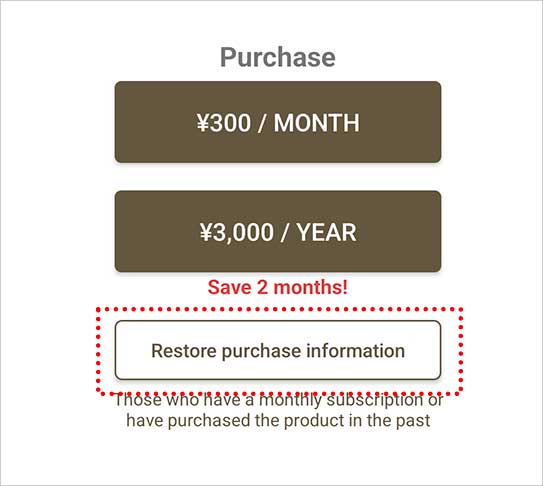
If you use the same Apple ID, you only need to pay once. After subscribing on one iPhone, simply select “Restore Purchases” in the “Use the Premium Plan” screen on your other devices.
Then you can use the app on all your iPhones without any additional charges.