
Peach Ninja
I want to arrange the sticky notes neatly!

Admin Ataka
No problem! Let me show you how to line them up neatly.
Admin Ataka
Let’s start with centering.
Long press on the screen, and a menu will pop up. Tap ‘Aline center‘.


Peach Ninja
They’re perfectly in the middle!
Admin Ataka
Next, let’s try left alignment.
Press and hold the sticky note you want to align to the left—let’s say the one that says ‘I love ice cream’—then tap ‘Alignment‘ from the menu.


Peach Ninja
Wow! Everything’s on the left!
Admin Ataka
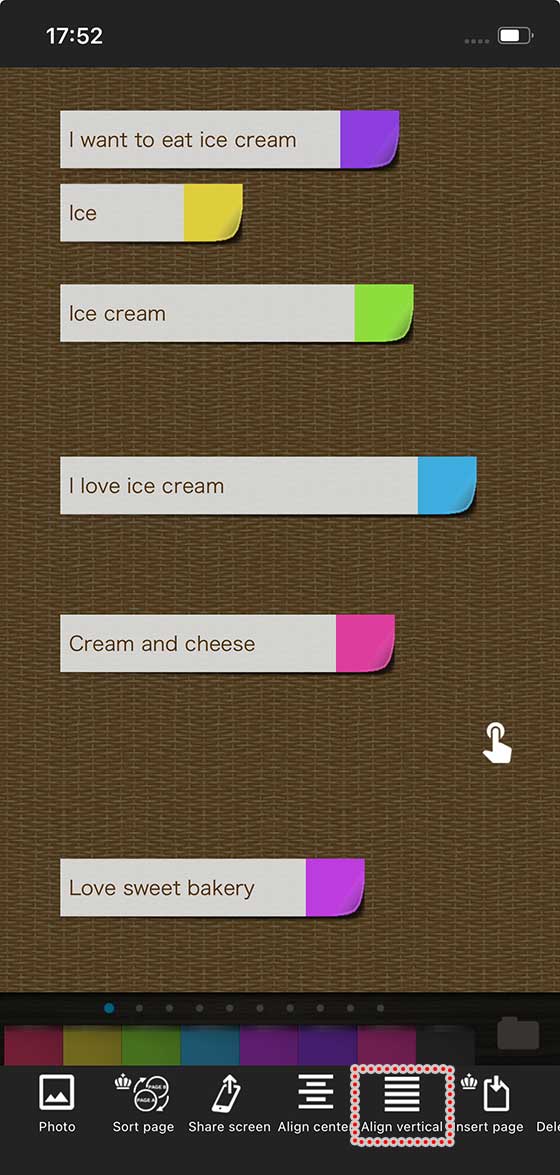
If you want to align items vertically, long press the background and tap ‘Align Vertical‘ from the menu that appears

Peach Ninja
I’ve done it! Everything is perfectly lined up!